Projectivy Launcher
- 4.6
- Rating
- 1.00M
- Installs
- Free
- Price

 Analysis by App-foxy
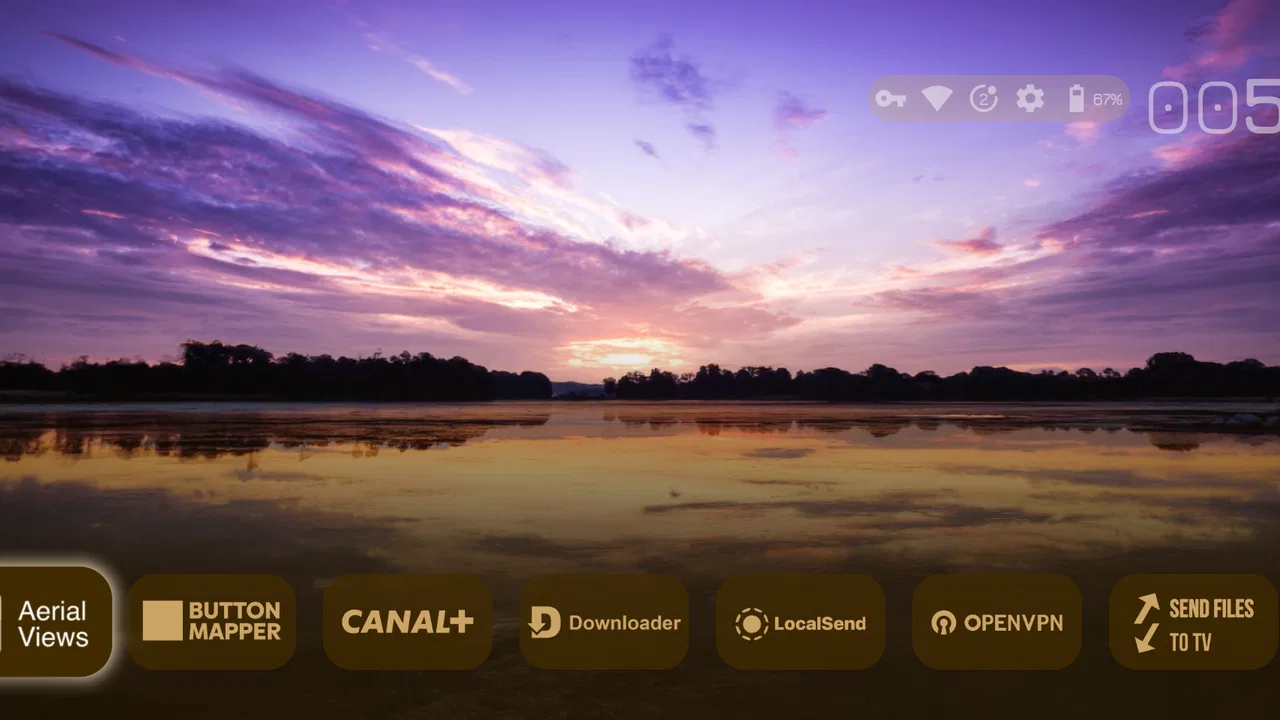
Projectivy Launcher is the kind of Android TV app I appreciate more after living with a crowded home screen for a while. Instead of treating the television interface as something I have to accept, it gives me a way to reshape that first screen around the services and shortcuts I actually use. Spocky’s launcher sits in the personalization category, and its purpose is refreshingly focused: make the Android TV experience feel less cluttered and more intentional.
I tested it with a practical mindset rather than looking for flashy decoration. My main question was whether a replacement launcher could make daily navigation quicker without turning setup into another project. The answer is mostly yes, although the experience depends on how much control you want. People who enjoy arranging their home screen will find plenty to explore. Someone who only wants to press the home button and leave everything unchanged may find the extra choices unnecessary.
It is free to install, carries an Everyone age rating, and works with Android versions from 6.0 onward. The app has reached over one million installs and holds a 4.5 average from around two thousand ratings, which gives it a useful level of real-world visibility without being a reason to skip your own testing. I would judge it mainly by how clearly it lets me control the screen, how predictable it feels after installation, and whether the customization remains useful once the novelty wears off.
You May Also Like

 Blood Strike: 2.5 Anniversary
Blood Strike’s Loadouts Turn Every Drop Into a Tactical Gamble
A close look at Blood Strike’s custom loadouts: how fast access to signature weapons reshapes its battle royale rhythm, rewards preparation, and narrows the gap between fights.

 Pandora - Music & Podcasts
Pandora’s Music Is Easy to Start, but Harder to Recover
Pandora’s strength is its low-effort path from a seed to a station. Its weak spot is how much confidence it asks you to place in connection, setup, and quiet recovery.

 8 Ball Pool
 Is Built on Rivalries, Rematches, and Routine
A close look at the rivalries, rematches, shared routines, and unanswered safety questions that turn a quick pool match into a persistent mobile community.

 Samsung Music
’s Quiet Strength Is Playing What You Already Own
Its reach comes less from spectacle than from dependable access to a personal library. That simplicity is both the app’s strongest retention engine and its ceiling.

 AccuWeather: Weather Radar
AccuWeather Review: A Quick, Clear Forecast for Everyday Decisions
For everyday plans, the best forecast is the one you can understand quickly. AccuWeather makes rain timing, radar, and local conditions easy to act on, with a few trade-offs.

 Hill Climb Racing
Why Hill Climb Racing Still Turns Crashes Into One More Run
A tiny car, a bumpy hill and one more upgrade: Hill Climb Racing keeps resurfacing because its simple chaos makes every near-miss feel personal.
More From Our News Desk



How Projectivy Launcher changes the first screen
The biggest difference from the usual Android TV launcher is the sense of ownership. Standard launchers often place rows of recommendations, recently used items, promotional content, and app shortcuts into a layout that is convenient for the platform but not always convenient for me. Projectivy Launcher approaches the home screen as a workspace. I can think about what belongs there, what should be hidden from view, and which actions deserve a prominent position.
That distinction matters in ordinary use. When I sit down to watch something, I do not want to scan several rows before reaching the applications I use most. A more deliberate arrangement can reduce that small amount of friction every evening. It is not a dramatic performance upgrade, and it will not improve a slow streaming service, but it can make the route from turning on the television to starting an app feel cleaner.
I also like that this is a launcher rather than another content service. It does not ask me to change where I watch films or shows. It changes the layer through which I reach those services. That makes it more flexible than choosing a new streaming app, but it also means its value is tied to the quality of the underlying Android TV device. If the television or box has limited hardware, Projectivy Launcher cannot solve every delay or awkward system menu.
Personalization that has a practical purpose
Customization is most useful when it reflects habits rather than decoration. I would start with the applications used several times a week, put them where the remote reaches them naturally, and remove distractions that rarely deserve attention. A household television can benefit from this especially well: the home screen can be arranged around shared services instead of mirroring one person’s phone-like app collection.
There is also a helpful difference between a screen that looks tidy and one that supports quick decisions. A beautiful layout can still be inconvenient if the important shortcut is buried or if the remote requires too many directional presses. My advice is to judge every change by the number of steps it removes. If a visual adjustment looks impressive but makes navigation harder, undo it. Projectivy Launcher gives room for that kind of experimentation, but it does not automatically know which arrangement is best for your household.
One non-obvious benefit is that a replacement launcher can make an older Android TV interface feel less tied to its original presentation. That does not mean the device becomes new, and I would not install it expecting a guaranteed speed boost. The gain is organizational: the same apps and remote can feel easier to manage when the opening screen is less noisy.
What setup feels like in real life
The first session is the part where patience helps. A launcher replacement affects the place I normally return to, so I would not configure it in a hurry just before guests arrive or before a film starts. I would install it when I have time to look through the available choices, decide which apps matter, and test the remote from the main screen into a few common destinations.
My preferred approach is gradual. I would first create a simple home screen with only the essentials, use it for a day, and then add anything genuinely missed. This avoids a common personalization mistake: filling every available space simply because it exists. The strongest setup is usually the one that makes the next action obvious, not the one that exposes every installed app at once.
For a family television, I would also test the arrangement with someone who did not configure it. That reveals whether the layout is intuitive or merely familiar to its creator. A visitor should be able to find the main streaming applications without needing an explanation. If the design only works after a guided tour, it may be too clever for a shared room.
Trust, controls, and moments that deserve attention
A launcher occupies a sensitive position because it appears before many other apps. It is reasonable to ask what I am allowing it to do, what choices are visible, and whether I can return to a familiar setup if I change my mind. I do not treat a polished interface as proof of good privacy practices, and I would not make claims about permissions or data handling beyond what is clearly shown during installation and in the app’s own controls.
That cautious approach is important here. Projectivy Launcher is made by Spocky and has been available since August 6, 2020, with current version 4.68. Those details tell me that it is an established personalization tool rather than a brand-new experiment, but they do not by themselves answer every trust question. I still pay attention to the Android permission prompts, the settings screens, and any choices presented when the app becomes the default home experience.
Check the visible choices before making it your default
Replacing a launcher can feel more consequential than installing an ordinary utility because the home button becomes part of the decision. Before committing, I would look for the system option that controls the default launcher and make sure I know how to return to the original one. This is not a criticism of Projectivy Launcher specifically; it is sensible housekeeping for any app that changes a central part of the interface.
I would also read each permission request instead of approving everything automatically. A launcher may need certain access to provide its interface, but the correct response is to judge each request in context. If a prompt appears that does not make sense for the action I am trying to perform, I would pause and investigate rather than assume it is required. The same applies to settings that affect other apps or system behavior: I prefer clear, reversible choices.
Account controls deserve the same attention. I would not create or connect an account merely because a setup screen offers one, and I would check whether personalization can be used without sharing more information than I want to share. If a feature depends on an account, I want the screen to explain that relationship plainly. When the choice is optional, keeping the setup local and simple is usually my preference for a television launcher.
Where data-sensitive moments can appear
The most data-sensitive moments are not necessarily dramatic. They can happen when a launcher displays installed applications, organizes recently used items, or presents recommendations and shortcuts based on activity. I would look at what is shown on the television when other people are in the room. A home screen can reveal viewing habits or installed services even without displaying private messages.
This is one reason I prefer a deliberately limited layout. Showing fewer items is not only cleaner; it can reduce accidental exposure when the television is visible to family members, visitors, or anyone passing through the room. I would avoid placing sensitive or personal apps in prominent positions if the device is shared, and I would review the screen after another household member has used it.
Notifications and previews also deserve a quick check. If the launcher surfaces information from elsewhere on the device, I would decide whether that is useful on a large screen or simply too revealing. The right choice depends on the household. A private bedroom television has a different risk profile from a living-room display, and Projectivy Launcher is most useful when its flexibility is applied with that context in mind.
Keeping control when something goes wrong
Every replacement interface should have an exit plan. I would keep the original launcher available until I had used Projectivy Launcher for several normal sessions, including a restart. If navigation becomes confusing, an app shortcut disappears, or the home button behaves differently than expected, I want to know how to reach Android TV’s system settings and switch back.
I would also avoid changing many unrelated device settings at the same time. If I install the launcher, alter display behavior, reorganize applications, and change remote preferences in one sitting, it becomes difficult to identify the source of a problem. A staged setup is slower for a few minutes but much easier to troubleshoot. That is a useful trade-off for anyone who wants control without losing track of what changed.
The app is free, although in-app purchases range from $0.99 to $7.49 per item. I would treat those purchases as optional enhancements rather than part of the basic decision to try the launcher. Before buying anything, I would confirm what the particular item changes and whether it solves a problem I actually have. A free launcher can become poor value if I pay for customization that I never use.
Who will benefit, and who should stay with the usual launcher
Projectivy Launcher is a strong fit for people who feel that their Android TV home screen is working against them. It suits viewers with a large collection of installed apps, households that want a calmer shared interface, and users who enjoy arranging technology around real routines. It is also a sensible option for anyone who has tried to make a television interface less promotional or less crowded and found the built-in controls too limited.
I think it is particularly useful in a simple everyday scenario: I finish work, pick up the remote, and want to open one of a few familiar services without passing through rows I never use. A focused arrangement can put those destinations within immediate reach. Later, another person in the home can use the same screen without needing to know how the launcher was configured. That is the kind of modest improvement that becomes valuable through repetition.
It is less suitable for someone who wants the manufacturer’s interface exactly as delivered. If you dislike adjusting layouts, comparing settings, or remembering which launcher is active, the default option may be better. The standard launcher has the advantage of familiarity and usually requires no personal maintenance. Projectivy Launcher asks me to make decisions, and that is a benefit only when I am willing to make them.
I would also be cautious on a device that is already difficult to operate. A replacement launcher may simplify the home screen, but it introduces another layer to understand. If the television is used by someone who relies on a fixed sequence of buttons, even a well-designed alternative can create confusion. In that case, I would test it with the actual user before changing the default experience.
How it compares with built-in Android TV alternatives
The built-in launcher is the safer choice for zero setup. It is already integrated into the device, familiar to other household members, and less likely to require a learning period. Its weakness is that I have to accept more of its organization and presentation. Projectivy Launcher is the more adaptable choice when the default home screen does not match the way I use the television.
Compared with a simple app shortcut or a basic wallpaper customization tool, this launcher addresses the whole starting point rather than one visual detail. That gives it more influence but also more responsibility. A wallpaper can be ignored if it is inconvenient; a launcher affects the route to nearly everything. I would therefore choose Projectivy Launcher for structural control, not merely for a different look.
Another alternative is to leave the home screen alone and organize apps inside the device’s existing categories. That can work for a small collection, and it avoids changing system behavior. Once the number of services grows or the default rows become distracting, however, the built-in organization may feel like a compromise. Projectivy Launcher earns its place when the time saved during repeated navigation outweighs the setup effort.
My practical verdict after weighing control against simplicity
I recommend Projectivy Launcher to Android TV users who want their television to reflect their own habits instead of the platform’s default priorities. Its main strength is not a single decorative trick. It is the ability to make the first screen more deliberate, with the potential to reduce clutter and shorten the path to frequently used apps. The fact that it is free to try makes that experiment relatively easy, provided I approach permissions, account prompts, and default-launcher settings carefully.
My recommendation comes with a condition: configure it slowly and keep reversibility in mind. I would begin with a small number of essential apps, test the remote, restart the device, and see whether another person can use the screen without help. I would review what is visible in a shared room and avoid paying for an option until I understand its practical benefit. Those steps turn personalization into a controlled improvement rather than a source of new confusion.
There are real reasons to stay with the usual launcher. It is familiar, integrated, and adequate for people who rarely navigate beyond a few services. Projectivy Launcher is not necessary for everyone, and I would skip it if the current interface already feels clear or if nobody in the household wants to maintain a customized layout. It is best understood as a tool for correcting a mismatch between the device’s home screen and the way you actually use it.
For me, that is a worthwhile role. Spocky’s app gives Android TV a more personal starting point while leaving the underlying services in place. I would install it when the default interface feels busy, test its visible choices before making it permanent, and keep the original launcher available until the new arrangement proves itself. The best result is not the most customized screen; it is the one that gives you control without making everyday television use harder.
FAQs for Projectivy Launcher
01What is Projectivy Launcher?
Projectivy Launcher is a customizable app launcher designed to enhance the user experience on Android devices. It offers a range of features that allow users to personalize their home screen, adjust layouts, and improve overall device efficiency. The app is known for its lightweight design and user-friendly interface.
02Is Projectivy Launcher compatible with all Android devices?
Projectivy Launcher is compatible with most Android devices running version 5.0 (Lollipop) and above. However, performance and feature availability may vary depending on the device's hardware capabilities and software version. It's recommended to check the app's requirements in the Google Play Store before downloading.
03Does Projectivy Launcher affect device performance?
Projectivy Launcher is designed to be lightweight and efficient, minimizing its impact on device performance. It optimizes memory usage and enhances speed, allowing users to enjoy a smoother experience. Users with older or lower-end devices may notice a more significant improvement compared to default launchers.
04What customization options are available in Projectivy Launcher?
Projectivy Launcher offers extensive customization options, including themes, icon packs, and widget resizing. Users can arrange app icons, adjust grid size, and apply various visual effects. The launcher also supports gesture controls and app drawer customization, giving users complete control over their home screen's appearance and functionality.
05Is Projectivy Launcher secure to use?
Yes, Projectivy Launcher is secure to use. It does not require unnecessary permissions, ensuring user privacy and data protection. The app is regularly updated to address security vulnerabilities and improve user experience. Users are encouraged to download the launcher from reputable sources like the Google Play Store to ensure safety.
Pros
- Highly customizable interface options.
- Smooth and fast performance.
- Intuitive user experience design.
- Supports various widget integrations.
- Offers efficient app organization tools.
Cons
- Limited free version features.
- Occasional minor bugs in updates.
- Requires learning curve for new users.
- Lacks some advanced automation.
- Some features require premium purchase.

Projectivy Launcher
Gallery